
Review output, then:
4 blocker · 19 important · 26 recommended · 23 passing · 86 total findings across 10 categories.
Executive summary
This report covers the mandatory 10 audit categories required for every 121 Group pre-launch review. Each finding is classified by severity and assigned a short ID for tracking.
| Severity | Count | Meaning | |---|---|---| | Blocker | 4 | Must be fixed before launch. Real risk to security, accessibility, or basic function. | | Important | 19 | Should be fixed before launch if possible. Noticeable impact on quality. | | Recommended | 26 | Nice to have. Hardening or polish items. | | Already good | 23 | Verified passing. Recorded for transparency. |
Security & hardening
Automated security audit covering both the public surface (headers, exposed files, auth surface) and authenticated filesystem-level checks via cPanel (WP core version, wp-config.php hardening, installed plugin/theme versions, debug.log review). WP install located at /home/gr21ou1p/public_html/Pybar.
Response header X-Powered-By: PHP/8.4.20 reveals the PHP version, helping attackers target known CVEs.
Fix: Add to .htaccess or php.ini:
Header unset X-Powered-ByOr in php.ini: expose_php = Off
The site does not set the following security headers:
- Strict-Transport-Security (HSTS) (
strict-transport-security) — Enforces HTTPS for returning visitors. Recommended:max-age=31536000; includeSubDomains; preload - X-Content-Type-Options (
x-content-type-options) — Should benosniffto prevent MIME-type confusion attacks. - X-Frame-Options (
x-frame-options) — Should beSAMEORIGINorDENYto prevent clickjacking. - Referrer-Policy (
referrer-policy) — Should bestrict-origin-when-cross-originor stricter. - Permissions-Policy (
permissions-policy) — Should restrict unused browser features (camera, microphone, geolocation). - Content-Security-Policy (CSP) (
content-security-policy) — Advanced: restricts which scripts/styles can load. Complex to configure — add after launch once site is profiled.
Fix: Add a combined header block to .htaccess:
<IfModule mod_headers.c>
 Header always set Strict-Transport-Security "max-age=31536000; includeSubDomains" env=HTTPS
 Header always set X-Content-Type-Options "nosniff"
 Header always set X-Frame-Options "SAMEORIGIN"
 Header always set Referrer-Policy "strict-origin-when-cross-origin"
 Header always set Permissions-Policy "camera=(), microphone=(), geolocation=()"
</IfModule>
Defer CSP until post-launch.
The meta generator tag reveals the WordPress version. Attackers use this to match known CVEs.
Fix: Remove via functions.php:
remove_action('wp_head', 'wp_generator');
add_filter('the_generator', '__return_empty_string');https://pybar.121group.dev/readme.html returns HTTP 200 with full WP version info.
Fix: Block via .htaccess:
<FilesMatch "^(readme|license|CHANGELOG)\.(txt|html|md)$">
 Require all denied
</FilesMatch>
Or simply delete the file (it is recreated on core updates — add deletion to post-update runbook).
Attackers use these to match against CVE databases and run targeted exploits.
| Plugin | Version |
|---|---|
| spectra-pro | 1.2.10 |
| ultimate-addons-for-gutenberg | 2.19.25 |
| astra-addon | 4.13.1 |
| ewww-image-optimizer | 8.5.0 |
| mailchimp-for-wp | 4.12.2 |
Fix: Block via .htaccess at site root:
<FilesMatch "^(readme|license|changelog|CHANGELOG)\.(txt|html|md)$">
 Require all denied
</FilesMatch>
A good security plugin (Wordfence / SolidWP / All In One WP Security) handles this automatically.
Although the site is already installed (page shows "Already Installed"), the endpoint itself should be blocked. If the DB is ever corrupted, an attacker who reaches install.php can take over the installation.
Fix: Block via .htaccess:
<Files install.php>
 Require all denied
</Files>All tested sensitive paths return 403 or 404.
GET /?author=1 redirects to /author/121-josh/, exposing the first registered user's slug (usually an Administrator).
Fix (pick at least one):
- Block
?author=Nviafunctions.php:
add_action('template_redirect', function () {
 if (isset($_GET['author'])) { wp_safe_redirect(home_url(), 301); exit; }
});- In phpMyAdmin, edit
wp_usersand setuser_nicenameto something other than the username.
- Use a security plugin with "disable user enumeration" option.
xmlrpc.php is a historical WP feature used by Jetpack and some mobile apps. It is also a common brute-force target via system.multicall.
If unused, disable via functions.php:
``php
add_filter('xmlrpc_enabled', '__return_false');
``
Or block via .htaccess:
``apache
<Files xmlrpc.php>
Require all denied
</Files>
``
- Login is at the default URL, which is the first target of automated brute-force attacks. Consider:
- Rate limiting via a security plugin (Wordfence, SolidWP)
- Changing the login URL via "WPS Hide Login" or similar
- Requiring 2FA for all Administrator and Editor roles
Without this constant, a compromised Administrator account can edit PHP files directly from wp-admin → Appearance → Theme File Editor, turning a credential leak into remote code execution.
Fix in wp-config.php:
define( 'DISALLOW_FILE_EDIT', true );Also consider DISALLOW_FILE_MODS (blocks theme/plugin installs via UI entirely).
Enforces HTTPS for wp-admin and login. Usually fine without it if the site already redirects HTTP → HTTPS at the server level, but explicit is safer.
Fix in wp-config.php:
define( 'FORCE_SSL_ADMIN', true );Read directly from wp-includes/version.php. Compare against the latest stable release at https://wordpress.org/download/ — if a minor version is behind, update as part of launch prep.
Exact versions from plugin PHP header blocks (more reliable than readme.txt leak detection):
| Plugin slug | Version | Name |
|---|---|---|
| astra-addon | 4.13.1 | Astra Pro |
| custom-fonts | 2.1.17 | Custom Fonts |
| ewww-image-optimizer | 8.5.0 | EWWW Image Optimizer |
| mailchimp-for-wp | 4.12.2 | MC4WP: Mailchimp for WordPress |
| meta-box-lite | 2.5.0 | Meta Box Lite |
| seo-by-rank-math | 1.0.268 | Rank Math SEO |
| spectra-pro | 1.2.10 | Spectra Pro |
| ultimate-addons-for-gutenberg | 2.19.25 | Spectra |
| wp-grid-builder | 2.3.2 | WP Grid Builder |
| wp-grid-builder-map-facet | 2.0.4 | WP Grid Builder - Map Facet |
| wp-grid-builder-meta-box | 1.2.0 | WP Grid Builder - Meta Box |
For CVE checking, paste this list into https://wpscan.com/ or https://patchstack.com/database/ (both offer free lookups).
Unused themes still receive security updates but also widen the attack surface if any have vulnerabilities. Keep ONE as a fallback, delete the rest:
twentytwentyfivev1.4twentytwentyfourv1.4twentytwentythreev1.6
Fix (WP admin): Appearance → Themes → hover on each → Theme Details → Delete.
Performance & Core Web Vitals
Automated performance audit via Google Lighthouse in mobile-simulated mode (Moto G4, 4G). Score: 96/100. CrUX real-user data unavailable (see info finding below). Full Lighthouse report stored in ctx.shared.lighthouse for reference.
Mobile throttled test (simulated Moto G4 / 4G). Excellent.
Below 2.5s — good.
Below 0.1 — good.
Proxy for real-world INP. Under 200ms is good.
Good.
Lean page. Good.
Review plugin output. Lighthouse identified JS that is loaded but not executed on the homepage. Consider conditionally loading scripts only where needed.
The shared PageSpeed Insights API quota is exhausted. To enable real-user Core Web Vitals in future audits:
- Go to https://console.cloud.google.com/apis/credentials
- Create a free API key (no billing account needed for CrUX/PSI)
- Restrict the key to Chrome UX Report API + PageSpeed Insights API
- Save it to
C:/Users/Joshua/.pi-secrets/crux.envas:
GOOGLE_CRUX_API_KEY=AIza…Future audits will then include real-user LCP / INP / CLS / FCP / TTFB percentile data from millions of real Chrome users — the actual signal Google uses for SEO ranking.
Accessibility (WCAG 2.2 AA)
Automated scan failed for this category: net::ERR_CONNECTION_TIMED_OUT at https://pybar.121group.dev/. Needs manual review.
Re-run the audit or perform this category manually.
SEO
Automated SEO audit: meta tags, canonical, robots, sitemap, Open Graph, Twitter Card, schema.org, mixed content, link inventory. Checked the homepage deeply and 11 additional crawled page(s) for consistency. A full SEO audit should also cover keyword research, internal linking depth, and competitor analysis — human-judgement tasks beyond this scan.
"Underground Mining Contractor - Mining Services | PYBAR"
Add a canonical link to prevent duplicate-content issues.
<link rel="canonical" href="https://example.com/page/">(Yoast and RankMath do this automatically.)
Prevents staging content from being indexed by Google.
WordPress serves a default dynamic robots.txt if no physical file exists, but adding an explicit one is best practice.
Install/activate Yoast or RankMath to auto-generate one. Sitemaps accelerate search-engine indexing.
Link validation is performed in the Content Quality category. See there for broken-link findings.
All scripts, styles, images, iframes use HTTPS.
Pages crawled:
https://pybar.121group.dev/https://pybar.121group.dev/case-studies/https://pybar.121group.dev/news/https://pybar.121group.dev/contact/https://pybar.121group.dev/contact-us/https://pybar.121group.dev/news-resources/news/https://pybar.121group.dev/our-services/https://pybar.121group.dev/our-credentials/https://pybar.121group.dev/projects/https://pybar.121group.dev/our-approach/https://pybar.121group.dev/resource-centre/https://pybar.121group.dev/gallery/
Write a unique 140-160 char meta description for each key page. Missing pages:
https://pybar.121group.dev/contact-us/
https://pybar.121group.dev/case-studies/https://pybar.121group.dev/news/https://pybar.121group.dev/contact/https://pybar.121group.dev/contact-us/https://pybar.121group.dev/news-resources/news/https://pybar.121group.dev/our-services/https://pybar.121group.dev/our-credentials/https://pybar.121group.dev/projects/https://pybar.121group.dev/our-approach/https://pybar.121group.dev/resource-centre/
Every page should have a unique title for SEO. Duplicates cause Google to pick one and ignore the others.
- "News | PYBAR" shared by 2 pages:
- https://pybar.121group.dev/news/
- https://pybar.121group.dev/news-resources/news/
- Description shared by 2 pages: "Founded in 1993, PYBAR is the third largest underground hard…"
Content quality
Content-quality scan across the homepage and 11 additional crawled page(s). Checks: placeholder text, stale dates, broken links, NAP consistency, word count, caps-lock usage, plaintext email exposure. A full content audit (tone, grammar, SEO-keyword mapping) still requires human review.
Checked for: Lorem ipsum, TBD, Coming soon, [insert …], etc.
Found: 0263616400, 060589433
Ensure each is intentional. Inconsistent NAP (Name/Address/Phone) data across the site hurts local SEO.
Broken links hurt user trust and SEO. Fix or remove:
https://pybar.121group.dev/— timeouthttps://pybar.121group.dev/our-services/— timeouthttps://pybar.121group.dev/our-services/mine-development/— timeouthttps://pybar.121group.dev/our-services/mine-production/— timeouthttps://pybar.121group.dev/our-services/cable-bolting-and-production-drilling/— timeouthttps://pybar.121group.dev/our-services/raise-boring/— timeouthttps://pybar.121group.dev/our-services/shotcreting/— timeouthttps://pybar.121group.dev/our-services/fleet/— timeouthttps://pybar.121group.dev/our-credentials/— timeouthttps://pybar.121group.dev/our-credentials/company-profile/— timeouthttps://pybar.121group.dev/our-credentials/our-history/— timeouthttps://pybar.121group.dev/our-credentials/our-team/— timeouthttps://pybar.121group.dev/projects/— timeouthttps://pybar.121group.dev/case-studies/— timeouthttps://pybar.121group.dev/our-credentials/testimonials/— timeout
_…and 18 more_
These pages contain Lorem ipsum, TBD, or similar markers:
https://pybar.121group.dev/our-services/— Lorem ipsum placeholder
Thin content rarely ranks and may indicate incomplete pages:
https://pybar.121group.dev/news/— 12 wordshttps://pybar.121group.dev/contact-us/— 21 wordshttps://pybar.121group.dev/news-resources/news/— 12 words
_Reasonable content depth._
UI / UX
Automated scan failed for this category: net::ERR_CONNECTION_TIMED_OUT at https://pybar.121group.dev/. Needs manual review.
Re-run the audit or perform this category manually.
Images & media
Scanned 12 <img> element(s) on the homepage. Checked: alt text, explicit dimensions, lazy-loading, responsive srcset, file sizes, Open Graph image, favicon set, logo format.
WordPress adds loading="lazy" automatically via wp_get_attachment_image(). Themes that manually output <img> tags bypass this. Add loading="lazy" to below-the-fold images (and fetchpriority="high" to the LCP image).
12 are decorative (empty alt).
Links shared on Facebook, LinkedIn, Slack, WhatsApp, etc. will show without a preview image, reducing click-through rates.
If the logo is vector, serve as SVG for perfect scaling across screen densities.
Forms, integrations & conversion
Automated form inspection limited to what's visible in the page HTML. End-to-end form testing (submit → email delivery → CRM sync → thank-you page → analytics event) still requires manual or Cypress/Playwright testing before launch.
- Form #1: action=
(not set)method=POST - 7 input(s), 1 label(s)
- Nonce/CSRF token: NO
- Honeypot: detected
- reCAPTCHA/Turnstile/hCaptcha: not detected
Fix: WordPress forms must include wp_nonce_field(). Third-party form plugins (Gravity Forms, WPForms, Contact Form 7, Mailchimp for WP) handle this automatically — if one is missing, it usually means a hand-rolled form needs hardening.
Placeholder text is not a replacement for <label>. Every form field should have a visible associated label for accessibility and usability.
Adding autocomplete="email", autocomplete="tel", autocomplete="name" lets browsers pre-fill, improving conversion. Especially important on mobile.
WordPress's native wp_mail() uses the server's mail() function which is notoriously unreliable for deliverability (spam folder, bounces). Install WP Mail SMTP, FluentSMTP, or similar and route through a transactional provider (SendGrid, Postmark, Mailgun, Amazon SES).
- Also verify DNS records:
- SPF TXT record authorising the sender domain
- DKIM for email signing
- DMARC policy for anti-spoofing
Use https://mxtoolbox.com/domain/ to audit.
- Submit a test email and verify:
- Subscriber lands in the correct Mailchimp / ActiveCampaign / HubSpot list
- Confirmation email is received (double opt-in configured)
- Welcome automation triggers
- Unsubscribe link works
Analytics, tracking & legal
Surface-level analytics and compliance inspection. Full audit must also verify conversion goals are configured, events fire correctly on key actions (form submit, CTA click, scroll depth), and the cookie consent banner genuinely blocks non-essential trackers before acceptance.
- GTM container:
GTM-5CS24RN - GA4:
G-DW706NZ00J
Production tracker IDs on a staging site can pollute analytics data. Either use a separate "staging" GTM container, or gate analytics with a JS check for the production hostname.
Under GDPR (EU), CCPA (California), and increasingly other jurisdictions, analytics/marketing cookies require explicit consent BEFORE they fire. Install Complianz, Cookiebot, or similar and block non-essential trackers until consent is given.
- Legal pages should be linked from every page, typically in the footer. Required minimums:
- Privacy Policy (required in most jurisdictions)
- Terms of Service (protects the business)
- Cookie Policy (required under GDPR if any tracking is present)
Pre-launch, verify the site in Search Console so indexing can be monitored from day 1.
Launch readiness & infrastructure
Launch-readiness items combine automated checks with manual verification tasks. The automated items below are flagged; the manual items are included as checklist entries for the team to tick off in-browser.
Cert validation handled by the edge server (Cloudflare or LiteSpeed). Verify the certificate auto-renews and that includeSubDomains HSTS is configured across all production subdomains.
Current staging host: pybar.121group.dev
Before launch, run a search-and-replace across the entire database replacing the staging URL with the production URL:
```bash wp search-replace 'https://pybar.121group.dev' 'https://example.com' --all-tables --dry-run
Confirm at least ONE of the following is configured and tested:
- Synergy JetBackup (cPanel → JetBackup 5) — verify last backup ran successfully and restoration has been tested
- UpdraftPlus / BlogVault / ManageWP — scheduled offsite backups
- Host-level snapshots — confirm retention policy
Do a restoration test on staging before launch. An untested backup is not a backup.
Before launch day:
- Lower TTL on production A/CNAME records to 300s (5 min) at least 24 hours before cutover. This allows a fast rollback.
- Document the old DNS configuration (screenshots + export) in case we need to revert.
- Prepare the redirect map (see next item).
- Lock a launch window outside peak traffic hours; inform stakeholders.
- After launch: monitor real-user traffic and errors for 2 hours minimum before raising TTL back to 3600s.
If any URLs have changed between the old and new site (permalink structure, page slugs, category paths), you MUST provide 301 redirects to preserve SEO equity.
- Crawl the OLD production site (e.g. using Screaming Frog) and export the URL list.
- Map every old URL to its new equivalent.
- Implement redirects via Rank Math Redirections, Redirection plugin, or in
.htaccess. - Test 20 random old URLs post-launch and confirm 301 (not 404 or 302).
- A one-page document shared with the team, answering:
- Who authorises a rollback? (RACI)
- How do we restore the previous site? (DNS revert + DB restore)
- How long does it take? (target < 30 mins)
- What communications go out during a rollback?
Post-launch, at minimum:
- Uptime monitor hitting the homepage every 1-5 minutes: UptimeRobot (free), Better Uptime, Pingdom
- Error monitoring for custom PHP/JS: Sentry, Rollbar, or at least enable WP's
WP_DEBUG_LOGin production (carefully) - Analytics real-time view open on launch day
- Search Console coverage report checked daily for first week
The current site at pybar.121group.dev is correctly noindex, nofollow. When cloning / pushing to production, you MUST:
- In WP admin → Settings → Reading, uncheck "Discourage search engines".
- In Rank Math / Yoast, ensure the "noindex" toggle is off for production.
- Verify with
curl -I https://production.example.com/ | grep -i robotsreturns nothing, or the page source has no<meta name="robots" content="noindex">.
Both LiteSpeed QUIC.cloud (free, included with LiteSpeed Cache) and Cloudflare (free tier sufficient for most) dramatically improve perceived performance and block many attacks at the edge. Consider enabling before launch.
Disk at 31% of quota. Plenty of headroom.
All databases on this cPanel (including non-WordPress ones):
| Database | Size |
|---|---|
| gr21ou1p_121db | 2 MB |
| gr21ou1p_burrowsbuilt-db | 46 MB |
| gr21ou1p_cairns_db | 12 MB |
| gr21ou1p_capitalhoist_db | 15 MB |
| gr21ou1p_careers_phmc | 2 MB |
| gr21ou1p_eslbioscience | 6 MB |
| gr21ou1p_evolvedb | 82 MB |
| gr21ou1p_heavydieselgoup_db | 12 MB |
| gr21ou1p_hill_blume_db | 25 MB |
| gr21ou1p_jobfit_db | 30 MB |
| gr21ou1p_kdewa_db | 36 MB |
| gr21ou1p_ldhmf_db | 15 MB |
| gr21ou1p_nqresources_db | 19 MB |
| gr21ou1p_okeeffes_db | 55 MB |
| gr21ou1p_oryan_db | 11 MB |
| gr21ou1p_ozgoldenrush_db | 71 MB |
| gr21ou1p_ph_medical_centres | 56 MB |
| gr21ou1p_piccolo_db | 22 MB |
| gr21ou1p_pybar_db | 28 MB |
| gr21ou1p_qresources_db | 15 MB |
_… and 3 more._
Compare against https://wordpress.org/download/ — if a minor patch is available, update as part of launch prep. Major version upgrades (e.g. 6.8 → 7.0) should be tested on staging first.
Work through within 48 hours of cutover:
- [ ] Submit the XML sitemap to Google Search Console
- [ ] Submit to Bing Webmaster Tools
- [ ] Verify GA4 is receiving data (real-time view)
- [ ] Verify conversion events fire (test each form/CTA)
- [ ] Test 20 random old URLs → confirm 301 to new URL
- [ ] Run PageSpeed Insights on 5 key pages → save baseline
- [ ] Test all forms end-to-end (email delivery, CRM sync)
- [ ] Check 404 page still works
- [ ] Verify backup runs successfully on the new site
- [ ] Stakeholder sign-off captured in writing
Mobile-first readiness
Mobile-first readiness: viewport meta tag, CSS mobile-first heuristic, base font size, input-type appropriateness, horizontal overflow at 320px (iPhone SE), content parity with Googlebot-Mobile, plus real-device tests on iPhone 15 / Pixel 8 / Galaxy S24 / iPad Pro 12.9 via BrowserStack Automate.
width=device-width, initial-scale=1
Accessible CSS queries may be loaded after first paint, but this heuristic suggests the page may not be responsive at all. Verify manually at multiple breakpoints.
iOS Safari auto-zooms when a user taps an input with font-size <16px. This causes visual jank and can trap the user at the wrong zoom level. Fix by setting body font-size to at least 16px, or specifically for inputs:
input, select, textarea { font-size: 16px; }Fits iPhone SE / small Android screens.
Googlebot indexes your site using the mobile version. If content is hidden/stripped on mobile, Google won't see it.
- Desktop: ~1175 words of body text
- Googlebot-Mobile: ~35 words
Common causes: display:none on mobile, content-gating behind "Show more" buttons that aren't fully expanded for bots, tabbed content loaded via JS.
Fix: Use CSS to reflow, not hide. Use progressive disclosure that remains in the DOM.
Tested on 4 real devices via BrowserStack Automate. Screenshots captured from real hardware — click to enlarge:
iPhone 15 (iOS 17, Safari)
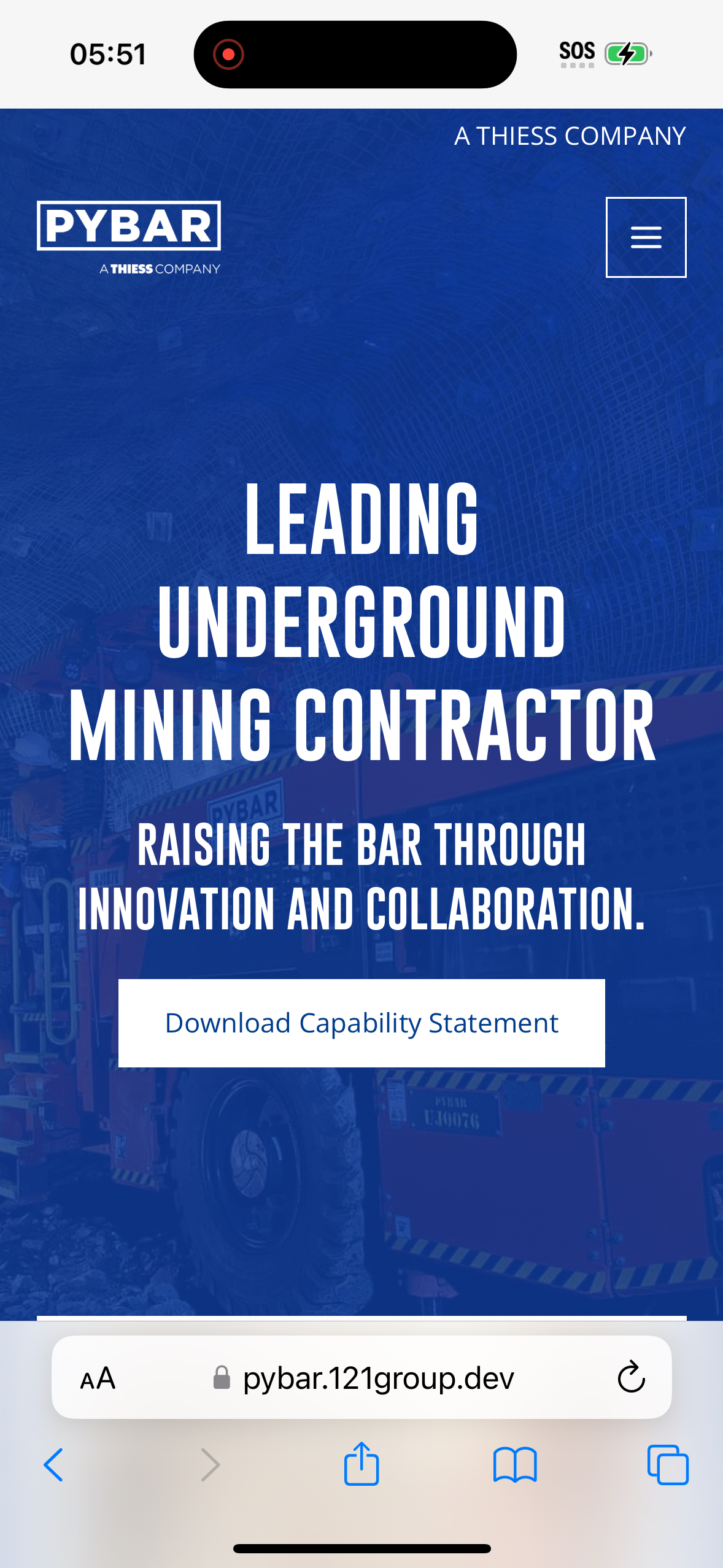
- Viewport:
393×659 - Body font-size:
14.6px - Horizontal overflow: no
- Page title: "Underground Mining Contractor - Mining Services | PYBAR"
Google Pixel 8 (Android 14, Chrome)

- Viewport:
411×784 - Body font-size:
14.6px - Horizontal overflow: no
- Page title: "Underground Mining Contractor - Mining Services | PYBAR"
Samsung Galaxy S24 (Android 14, Chrome)

- Viewport:
360×647 - Body font-size:
14.6px - Horizontal overflow: no
- Page title: "Underground Mining Contractor - Mining Services | PYBAR"
iPad Pro 12.9 (iOS 17, Safari)

- Viewport:
1024×1292 - Body font-size:
16px - Horizontal overflow: no
- Page title: "Underground Mining Contractor - Mining Services | PYBAR"